Do you supply TVs or tablets?
Hayati provides the queue software feed. Hardware is customer procured; we share kiosk and browser guidance.
Patient Queue Display
Where enabled, Hayati supplies the token and status spine from your Physical Appointment Dashboard; waiting-room display hardware is facility-procured so screens show token order, names (per privacy policy), and doctor assignment without crowding reception.
Desktop license—activate on your machine after verified payment. Not a cloud trial signup.
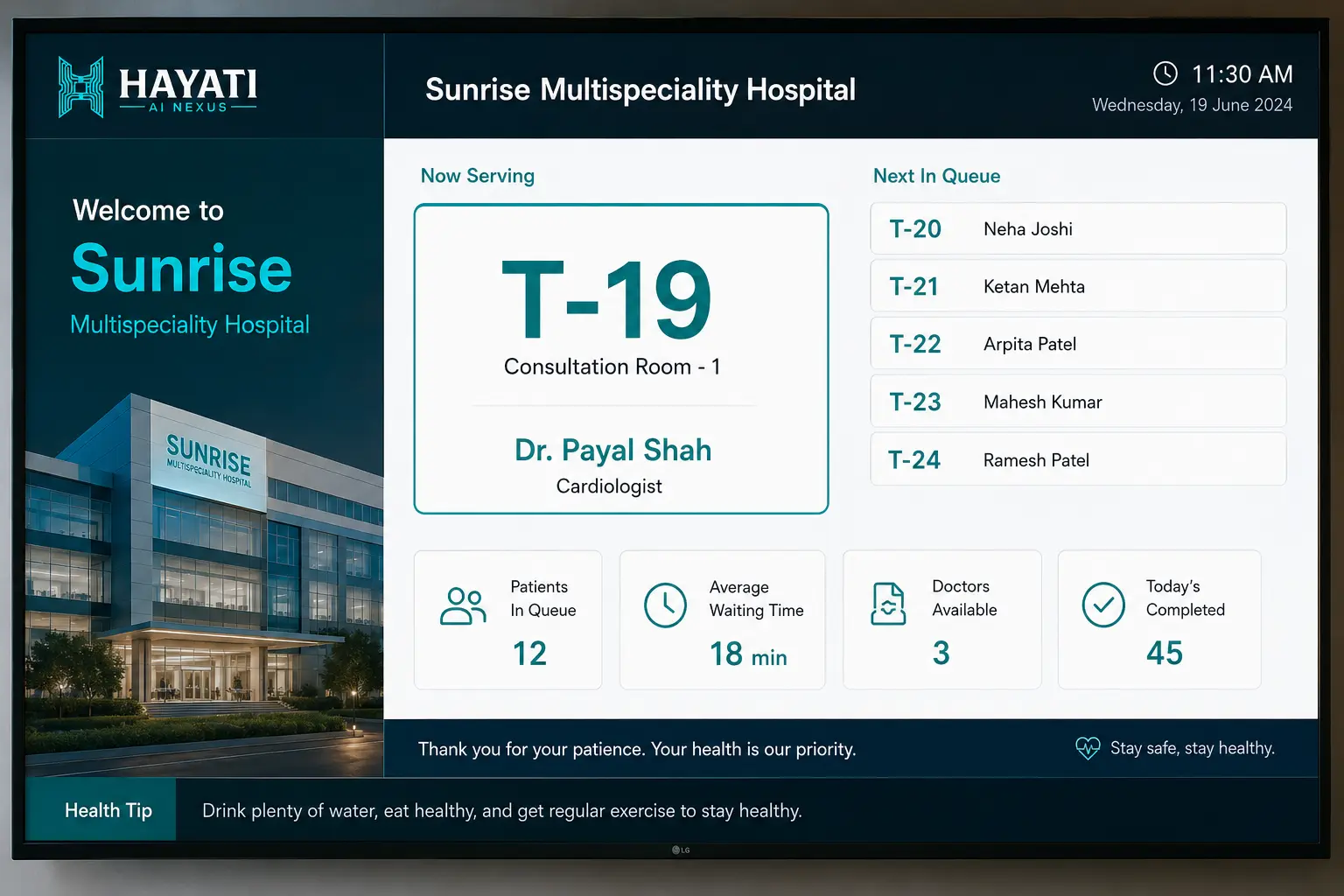
Patient Queue Display is the waiting-room view of Hayati's token and status spine—token order, patient names where your privacy policy allows, doctor assignment, and visit status. Hayati supplies the software feed where enabled; TVs, tablets, or LED boards are facility-procured. It updates when reception changes status on the Physical Appointment Dashboard—reducing repeated desk questions without inventing wait-time KPIs.
Check-in
Reception marks Waiting on dashboard
Queue feed
Display pulls live order + doctor
In consult
Status → In-Consultation on screen
Complete
Token clears for next patient
A Patient Queue Display is the public-facing view of your appointment queue—usually a facility-owned TV or tablet in the waiting area. It answers “whose turn is next?” without patients clustering at reception. Where enabled, Hayati supplies the token and status spine from the Physical Appointment Dashboard so token numbers, doctor names, and status changes stay consistent with what staff see behind the desk.
When reception checks in a patient, the token enters the Waiting state. The display refreshes on a short interval or push channel depending on deployment. When the doctor is ready, reception or the physician workflow marks In-Consultation; the display highlights the active token. Completed visits drop off the active list. Emergency insertions can override order per hospital policy with audit trail.
The display is not a separate spreadsheet updated manually. It subscribes to the same operational events as the dashboard—check-in, reschedule, no-show, and doctor switch. If reception moves a patient to another physician, the screen should reflect that within seconds on LAN deployments. Internet-only sites need stable local network between counters and displays.
Hospitals choose privacy posture: token-only for sensitive sites, or first name plus token for friendlier clinics. Doctor assignment columns reduce “which room?” questions. Configuration is per branch—pediatric clinics may hide surnames; corporate hospitals may show initials only. Your legal team approves display fields during rollout.
Hayati surfaces token order and visit status from reception clicks. Any site-side wait estimate is optional and depends on disciplined status updates—complex cases skew queues. Marketing does not invent wait-time KPIs; measure desk interruptions in your own pilot if you need operational proof.
Casualty and triage areas sometimes need priority tokens without breaking fairness for entire OPD. Hayati supports governed override reasons logged for audit—reception selects emergency insert, display shows priority badge, and standard queue resumes after clearance.
Hayati supplies the token and status software feed where enabled; display hardware is facility-procured. Common setups: 43-inch TV with browser kiosk, wall-mounted tablet, or existing LED board with HTML renderer. Brightness, mounting height, and viewing angle matter more than brand—pilot one waiting bay before multi-floor rollout.
When patients see their token approach, they stop asking reception every five minutes. Clinics report calmer waiting areas when combined with clear audio announcements optional per site. This is operational UX, not a guaranteed percentage reduction—measure desk interruptions during peak hour in your pilot.
AI Receptionist bookings appear on the dashboard and therefore on the queue display once checked in. Doctor Dashboard shows who is next aligned with the same token order. Misalignment means broken spine—Hayati implements one event source, not three competing lists.
Operations leaders can review status-event patterns by doctor, day, and department when reporting is enabled—useful for staffing conversations. Reports require consistent status updates; if reception skips In-Consultation clicks, data lies. Scope dashboards on walkthrough; do not treat marketing copy as published wait KPIs.
Pricing covers the software feed per branch, refresh infrastructure, and privacy configuration—not a bundled TV kit. Setup includes hardware checklist for facility-owned screens, kiosk browser lockdown guidance, reception training on status clicks, and one-week pilot on a single OPD floor.
Reception locates appointment on Physical Appointment Dashboard or creates walk-in token.
Status change publishes token to waiting-room feed with doctor assignment.
Facility-owned TV or tablet renders current token order and doctor assignment from the status spine where enabled.
Reception or nurse marks next token In-Consultation; display highlights active patient.
Waiting area sees active token clear from “up next” when policy hides in-room names.
Staff marks Completed; token leaves active queue for analytics.
Department reports refresh from status events when reporting is enabled—not invented wait KPIs.
Priority insert logged with reason; display shows override badge per hospital policy.
Hayati provides the queue software feed. Hardware is customer procured; we share kiosk and browser guidance.
Yes. Many hospitals use token-only display for privacy; clinics may show first names per policy.
Typically sub-minute on LAN deployments; depends on network layout between dashboard and display.
Yes, once reception checks in the AI-booked appointment on the Physical Appointment Dashboard.
Yes, with columns or color codes per doctor—layout configured per waiting area during setup.
Token order and any site-side estimates degrade. Training and optional reminders are part of rollout—not optional discipline.
Optional per site using PA integration or simple chime triggers—scoped during discovery.
Governed override with audit reason—prevents silent queue jumping without traceability.
LAN-connected displays can update from local events while cloud sync catches up—scope per deployment.
One OPD floor, one TV, two weeks measuring reception interruptions and patient complaints versus baseline.
All features: AI Receptionist · AI Retention Agent · Patient Queue Display · Doctor Dashboard · TPA billing · Multi-branch · Pharmacy inventory · GST billing · Offline billing · Queue management
Pilot one OPD with queue display and measure walk-in questions during peak hour.