Is Hayati a full EMR?
Hayati is a Healthcare Operating System with a Doctor Dashboard for operational clinical workflows. Full EMR depth, interfaces, and specialty modules are scoped honestly on walkthrough—not assumed here.
Doctor Dashboard
Physicians see today's queue, history context, and billing handoff on one screen—scoped to what your deployment includes without overclaiming a full EMR you have not purchased.
Desktop license—activate on your machine after verified payment. Not a cloud trial signup.
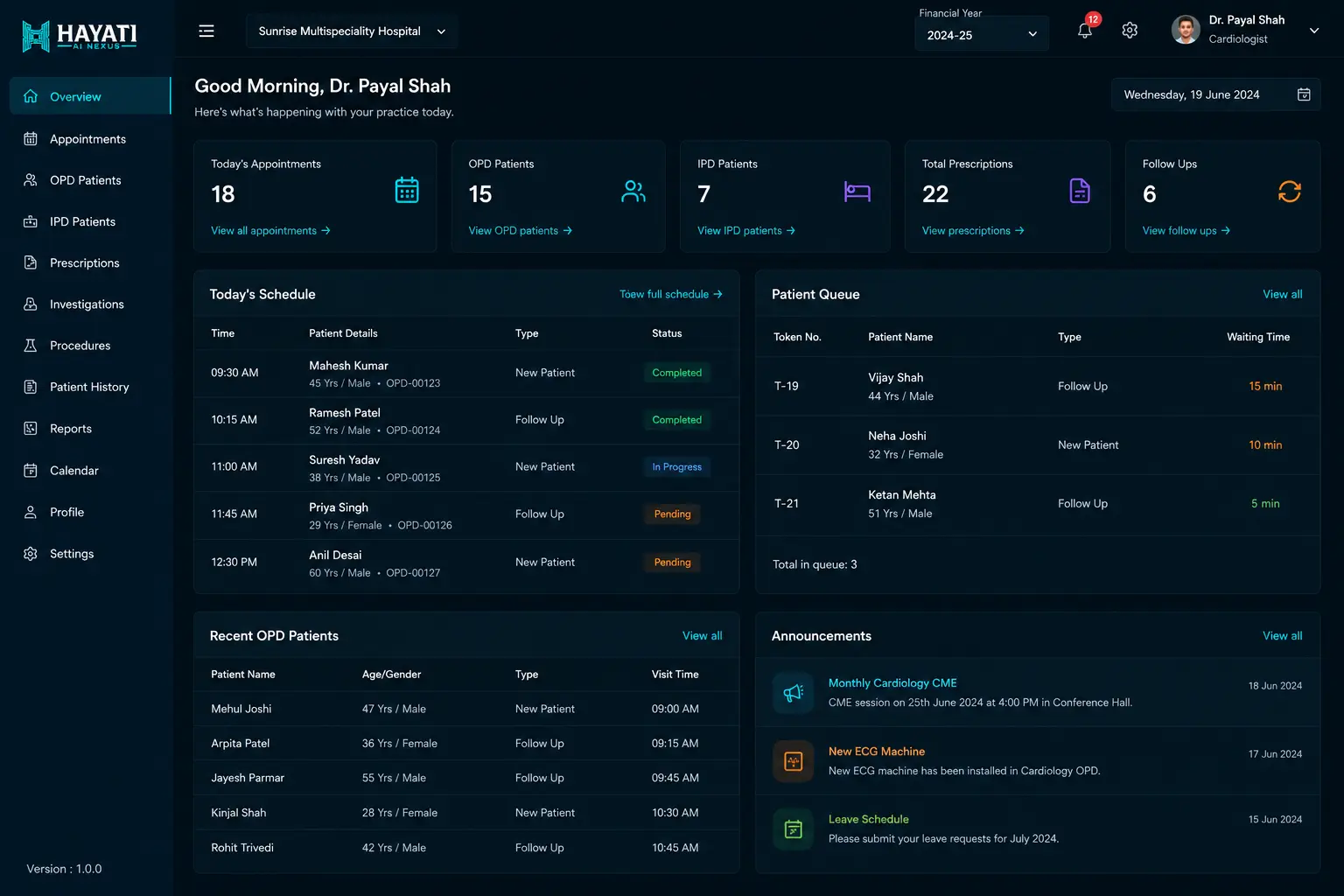
Doctor Dashboard is the physician workstation inside a Healthcare Operating System—it consolidates today's appointments, prior visit summaries, attachments where integrated, allergy and vitals alerts, and digital prescriptions that can flow to pharmacy and billing. Hayati describes depth honestly: operational clinical context, not unlimited EMR unless contracted.
Queue alert
Next patient from Patient Queue Display
History view
Prior visits, labs, prescriptions
Consult
Templates + vitals capture
Prescribe
Digital Rx → pharmacy + billing
A Doctor Dashboard is where physicians spend OPD hours— not a billing screen dressed as clinical software. It should answer: who is next, what happened last visit, what labs exist, what allergies apply, and what documentation today requires. Hayati connects the dashboard to queue, billing, and pharmacy on one spine when modules are enabled.
Before the patient enters, the physician sees prior visits, diagnoses documented in Hayati, prescriptions written on-platform, and notes from follow-up calls where retention is enabled. External EMR attachments may integrate when interfaces exist—marketing does not promise every legacy PDF auto-imports without a scoped interface project.
Integrated sites surface lab results and radiology links beside the consult. Without LIS/PACS integration, staff may attach PDFs manually—workflow still beats hunting WhatsApp forwards. Interface depth is discovery-dependent: HL7/FHIR projects are not implied by this feature page alone.
Nursing vitals captured at triage or reception appear as trends—BP, weight, spo2 where collected. Allergy and high-risk medicine flags show prominently to reduce preventable adverse events. Alerts depend on data entry discipline; empty vitals fields teach nothing.
Physicians write digital prescriptions with medicine, dose, and duration. When pharmacy and billing modules are on, orders propagate to dispense and charge workflows—reducing retyping at counters. Controlled drug policies (Schedule H) follow pharmacy rules configured per branch.
The dashboard list mirrors reception status: Waiting, In-Consultation, Completed. Doctors see no-show and reschedule events without shouting to the desk. AI Receptionist and retention bookings appear once checked in—same source of truth as Patient Queue Display.
When reception marks the next token In-Consultation, the dashboard highlights the patient card. This reduces lobby noise and idle physician time. Optional desktop notifications depend on deployment hardware.
Templates accelerate documentation—cardiology visit structure differs from pediatrics growth charts. Hayati configures templates during rollout; unlimited specialty libraries are not promised on day one. Hospitals should prioritize top three departments for phase one.
Tablet or phone views for ward rounds show patient lists and summaries where mobile module is licensed. Emergency bay usage may be read-only queue awareness—scope mobile write access carefully for medico-legal audit.
Follow-up dates set in the dashboard feed the AI Retention Agent call list. Retention outcomes write back as tasks for staff when patients book or refuse—closing the loop between physician intent and front-desk execution.
Paper files hide trends and duplicate prescriptions. Digital dashboards surface allergies and last medicines instantly—if data was entered. Efficiency gains require adoption, not installation alone. Pilot one OPD lane before hospital-wide mandate.
Doctor Dashboard sits beside Doctor Master for consultant profiles and specialty mapping, and beside payout and settlement workflows for commission or professional-fee sharing when your hospital policy requires them. Finance runs settlements from configured rules—not spreadsheet retyping after every OPD. Clinical depth remains scoped: operational clinical context and handoff, not a blanket full-EMR claim unless contracted.
Pricing includes physician seats, template packs, integration interfaces, and training hours. Setup covers role access, prescription formulary, pharmacy routing rules, Doctor Master profiles, payout rules where entitled, and medico-legal disclaimer review. Full EMR depth, if required, is a separate statement of work—not implied here.
Dashboard loads patients from Physical Appointment Dashboard with live status.
When reception marks In-Consultation, the active patient card opens for documentation.
Physician scans prior visits, attachments, vitals trends, and allergy banners before greeting.
Template-driven documentation records today's findings within deployment scope.
Medicines, doses, and instructions enter structured prescription rows.
Pharmacy ERP receives dispense queue when module enabled on same spine.
Smart Billing pulls procedures and pharmacy lines for cashier without retyping.
Next review date feeds AI Retention Agent and CRM when those modules are on.
Completed status updates Patient Queue Display for waiting-area accuracy.
Hayati is a Healthcare Operating System with a Doctor Dashboard for operational clinical workflows. Full EMR depth, interfaces, and specialty modules are scoped honestly on walkthrough—not assumed here.
Yes when pharmacy module is enabled on the same branch deployment. Otherwise export or manual dispense flows apply.
PACS integration is project-scoped. Without integration, staff may attach reports as PDFs.
Shared appointment status from the Physical Appointment Dashboard—one queue truth.
Role-based access supports locum accounts with audit logs—configured per hospital IT policy.
Top specialties configured during rollout; additional templates added in phases.
Mobile dashboard views are optional licensed modules—confirm devices and write permissions.
Follow-up dates documented in the dashboard feed retention lists when that module is enabled.
Audit trails record prescription and note changes per user—retention policies follow hospital IT standards.
One real OPD list, one prescription to pharmacy, one billing handoff, and one follow-up date—using your formulary.
All features: AI Receptionist · AI Retention Agent · Patient Queue Display · Doctor Dashboard · TPA billing · Multi-branch · Pharmacy inventory · GST billing · Offline billing · Queue management
Walkthrough with your specialty templates and attachment sources.